
Pipedrive
Sales CRM and pipeline management software for sales teams and small to mid-sized businesses. Pipedrive centralizes contacts, tracks deals in a visual pipeline, automates routine sales tasks, and provides reporting and AI-assisted suggestions to help reps prioritize activities and forecast revenue.
What is Pipedrive
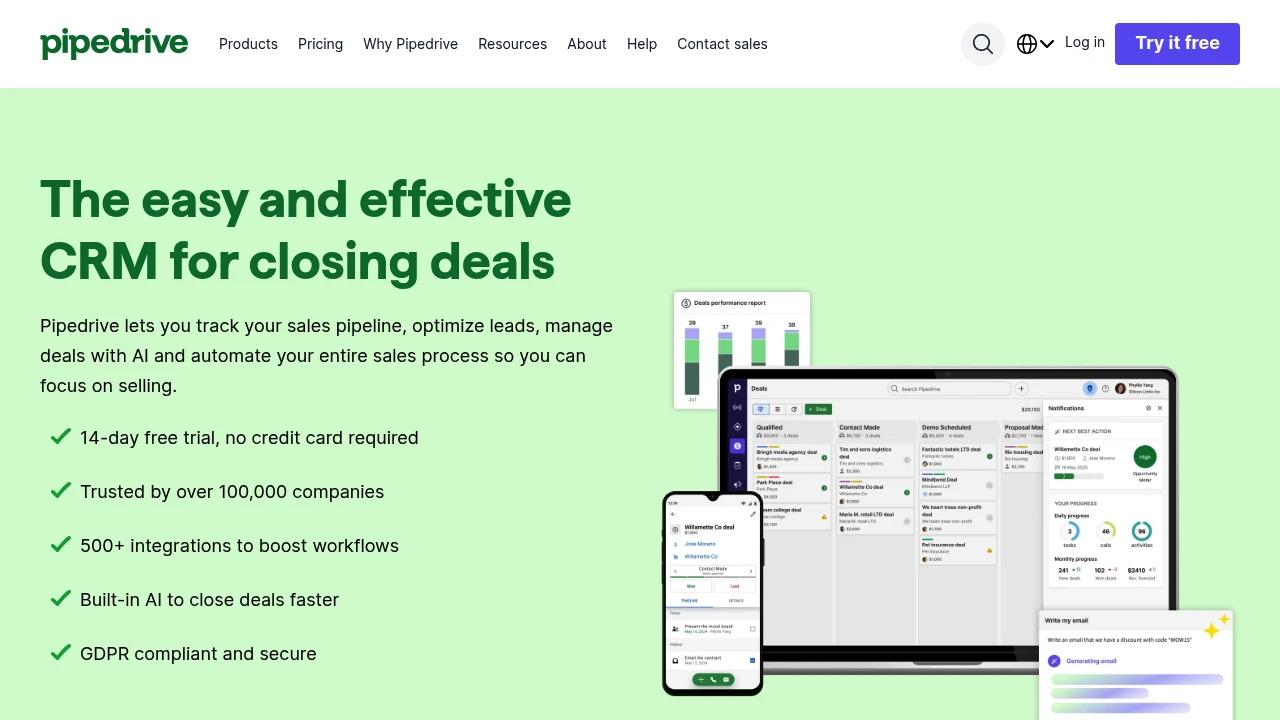
Pipedrive is a web-based sales CRM and pipeline management application designed for sales teams, account managers, and small to mid-sized businesses. It centers the user experience on a kanban-style pipeline that shows deals moving through stages, and it consolidates contacts, communications, deal history, and sales activities in one workspace. Pipedrive emphasizes quick setup, low administrative overhead, and features that let salespeople spend more time selling and less time managing data.
The product includes automated workflows, two-way email sync, calendar integration, activity reminders, and reporting dashboards. More advanced capabilities include AI-powered deal suggestions and lead-scoring, a marketplace of third-party integrations, and an API for custom integrations. For security and compliance details, review Pipedrive’s enterprise security features.
Pipedrive is used across industries where a repeatable, activity-driven sales process matters: B2B services, software sellers, agencies, and SMBs that need a practical CRM without extensive implementation overhead. Organizations typically adopt Pipedrive to gain a consistent sales process, automate routine follow-ups, and generate predictable forecasts.
Pipedrive features
What does Pipedrive do?
Pipedrive provides a structured environment for managing leads and deals from first contact through close. The core features are:
- Visual pipelines: a kanban board for moving deals across stages and quickly seeing pipeline health.
- Contact and activity management: consolidated contact records, timelines of touchpoints, and activity reminders so follow-ups are consistent.
- Email and calendar sync: two-way email integration and calendar syncing to keep communications and meetings linked to deals.
- Workflow automation: low-code automations for routing leads, sending follow-up emails, and updating fields based on triggers.
Beyond these basics, Pipedrive includes forecasting and reporting tools, AI-assisted insights that prioritize deals and suggest next steps, built-in calling and call logging, and a Marketplace with hundreds of integrations for marketing automation, accounting, video conferencing, and more. For a full feature list, see Pipedrive’s product features.
Pipedrive also supports customization: multiple pipelines, custom fields, product catalogs tied to deals, and role-based permissions for teams. Admins can tailor the platform to reflect a company’s sales stages and data needs without deep technical work.
Security, backups, and mobile access are part of the offering: mobile apps for Android and iOS enable on-the-road updates, while enterprise controls and encryption protect data in transit and at rest. See their details on hosting and compliance in the security documentation.
Pipedrive pricing
Pipedrive offers flexible pricing tailored to different business needs, from individual salespeople to enterprise teams. Their pricing structure typically includes monthly and annual billing options with discounts for yearly commitments and separate add-ons for advanced features and additional seats. Check Pipedrive's current pricing options for the latest rates and enterprise options.
Pipedrive commonly presents tiered plans to match different usage and capability needs; representative plan categories you will see in their pricing structure are:
- Free Plan: a short trial period (often 14 days) or a limited free tier for evaluation purposes.
- Starter: entry-level features for basic pipeline management and email sync.
- Professional: expanded automation, reporting, and team collaboration capabilities.
- Enterprise: advanced security, account management, and custom contract terms for large organizations.
Each plan typically documents included limits (users, automations, API calls) and optional add-ons such as extra reporting, CPQ/advanced products, or data migration support. Annual billing usually provides a percentage discount compared to month-to-month plans; check the linked page for specific savings and current offers.
Visit their official pricing page for the most current information.
How much is Pipedrive per month
Pipedrive offers monthly billing starting with entry-level plans and scales by features and users. Monthly rates vary by plan and by the number of seats; many customers choose monthly billing to start and then switch to annual billing for cost savings. For the current per-user monthly prices by plan, consult Pipedrive’s pricing page.
How much is Pipedrive per year
Pipedrive offers annual billing options that reduce the effective monthly cost for most paid plans. Annual commitments commonly include a discount versus monthly billing and are useful if you want predictable invoicing and lower per-user cost. Review the exact annual prices and savings on Pipedrive’s official pricing page.
How much is Pipedrive in general
Pipedrive pricing typically ranges from lower-cost entry plans for single users to higher-priced Enterprise contracts for large teams. Total cost depends on plan level, number of users, add-on modules (for example, advanced reporting or additional automation capacity), and any implementation or onboarding services you choose. To estimate your total spend include license fees, potential third-party integration costs, and internal rollout time; check Pipedrive’s pricing options to compare tiers.
What is Pipedrive used for
Pipedrive is used primarily to manage a sales pipeline in a way that enforces consistent sales activity. Sales reps use it to capture leads, schedule calls and meetings, log emails and calls, and move opportunities through defined stages until close. Managers use Pipedrive to monitor rep activities, set targets, run performance reports, and forecast revenue.
Typical use cases include lead routing, activity-based selling, inbound lead follow-up, and recurring deal tracking. Marketing teams often integrate Pipedrive with lead-capture tools to push qualified leads directly into the pipeline, and customer success teams may use it to track renewal opportunities.
The tool also supports process improvement: because every action is logged and can be reported on, teams identify bottlenecks, measure conversion rates between stages, and create automations to reduce manual touchpoints. Pipedrive’s AI features add prioritization suggestions so salespeople can focus on deals with the highest likelihood to close.
Because it focuses on simplicity and sales activities, Pipedrive is best for organizations that want a sales-first CRM rather than a full enterprise platform that blends marketing automation, service desk, and ERP.
Pros and cons of Pipedrive
Pros:
- Visual pipeline that is fast to adopt and easy for reps to use.
- Activity-driven sales methodology with reminders and automations that reduce missed follow-ups.
- Integrations marketplace connecting CRM to marketing, finance, and productivity tools.
- Mobile apps and two-way email sync that keep communications linked to deals.
- AI-assisted insights and forecasting to help prioritize work.
Cons:
- Less feature-rich for enterprise marketing automation compared with platforms that combine CRM and marketing features in one product.
- Some advanced reporting and custom analytics may require higher-tier plans or third-party tools.
- Organizations with complex multi-department workflows may need additional systems (support desk, ERP) integrated separately.
- Pricing can grow with seat counts and add-ons, so total cost of ownership should be calculated when scaling.
Pipedrive free trial
Pipedrive commonly offers a 14-day free trial that provides full access to core features so teams can evaluate the fit. The trial typically does not require a credit card and lets you import existing data, configure pipelines, connect email, and try automations. Because the trial exposes standard functionality, teams can test real workflows and measure the time saved on administrative tasks.
During the trial, you can explore integrations from the Pipedrive Marketplace to see how the product will function inside your stack. Trial data can usually be retained if you upgrade to a paid plan, simplifying the transition from evaluation to production use.
If you need a longer pilot or enterprise-level evaluation, Pipedrive’s sales team can arrange demos, onboarding support, or extended trials under certain conditions—contact sales via their pricing and contact options.
Is Pipedrive free
No, Pipedrive is not a permanently free product, but they provide a free trial for new users. After the trial, continued use requires a paid plan or selecting one of the available subscriptions. There may be promotional free tiers or limited trial offers at times; check Pipedrive’s pricing page for current trial and free-tier information.
Pipedrive API
Pipedrive provides a developer API that supports common CRM operations: create and update deals, contacts, activities, webhooks, and custom fields. The API is RESTful, returns JSON, and uses API tokens for authentication for standard developer access. This enables integrations with internal systems, marketing automation platforms, or custom reporting tools.
Rate limits, authentication details, and endpoint documentation are available in Pipedrive’s developer documentation; see the API reference and developer resources for specifics on endpoints, request formats, and example code. Many integrations in the Marketplace are built on top of the API, and enterprise customers can request higher-rate limits or additional support for custom integrations.
For teams planning integrations, factor in API call limits and design batched updates where possible, keep authentication tokens secure, and use webhooks to reduce polling overhead.
10 Pipedrive alternatives
Paid alternatives to Pipedrive
- Salesforce — A comprehensive CRM platform for enterprises with deep customization, advanced automation, and large-scale ecosystem support. Salesforce supports complex sales processes and integrates with many enterprise systems.
- HubSpot CRM — A free-to-start CRM that scales into marketing, sales, and service hubs. HubSpot emphasizes inbound marketing integration and includes extensive free CRM features with paid add-ons.
- Zoho CRM — A cost-effective, modular CRM with sales automation, process management, and integrated apps for finance and marketing in the Zoho suite.
- Freshsales — Now Freshworks CRM, it focuses on sales engagement, built-in telephony, and AI predictions tailored for SMBs and mid-market teams.
- Copper — CRM built for Google Workspace users that tightly integrates with Gmail and Google apps for minimal-friction workflows.
- Keap — CRM with integrated marketing automation and e-commerce workflows targeted at small businesses wanting combined CRM and automated customer follow-up.
Open source alternatives to Pipedrive
- SuiteCRM — An open source fork of SugarCRM that offers a full CRM stack with sales, marketing, and service modules. It supports on-premises hosting and customization.
- Odoo — An open source ERP with a CRM component; Odoo is modular and can be extended into inventory, accounting, and e-commerce, useful if you want CRM plus full business apps.
- EspoCRM — Lightweight open source CRM focused on sales automation, reporting, and API access; suited to teams that prefer self-hosting and custom development.
- CiviCRM — An open source CRM built with a focus on non-profits and advocacy groups that integrates with CMS platforms like WordPress and Drupal.
Frequently asked questions about Pipedrive
What is Pipedrive used for?
Pipedrive is used for sales pipeline management and CRM tasks. It helps teams capture leads, track deal progress in a visual pipeline, log communications, and automate follow-ups so reps can focus on closing opportunities.
How does Pipedrive integrate with email and calendar?
Pipedrive supports two-way email sync and calendar integration. You can connect business email accounts to send and log messages from the CRM, and sync personal or business calendars to keep activity reminders and meetings aligned with deals.
Does Pipedrive offer an API for integrations?
Yes, Pipedrive has a RESTful API with JSON responses and webhook support. Developers use the API to create and update deals, contacts, activities, and to subscribe to events; full documentation is available via Pipedrive’s developer resources.
Can Pipedrive be used by large teams?
Yes, Pipedrive scales to support large teams with enterprise controls. Larger organizations can use role-based permissions, account management, and custom security settings; enterprise agreements often include dedicated onboarding and support.
Is there a free version or trial of Pipedrive?
Yes, Pipedrive typically offers a 14-day free trial for new users. The trial allows evaluation of core features without a credit card; ongoing use after the trial requires a paid subscription.
Why choose Pipedrive over other CRMs?
Pipedrive is chosen for its sales-focused interface and ease of use. Teams that want a pipeline-first CRM, fast onboarding, and activity-driven selling often prefer Pipedrive to heavier, more configurable enterprise platforms.
When should a company consider upgrading to a higher Pipedrive plan?
Companies should consider upgrading when they need more automations, advanced reporting, or enterprise-level security controls. Growth often drives requirements for more seats, increased API limits, and centralized user management that appear in higher-tier plans.
Where does Pipedrive store data and how secure is it?
Pipedrive uses leading cloud hosting providers and implements encryption in transit and at rest. For specifics about certifications, hosting regions, and compliance controls, review Pipedrive’s security documentation.
What support options are available for Pipedrive users?
Pipedrive provides help center resources, guides, and live support depending on plan level. Paid plans typically include email and chat support, and enterprise agreements may include dedicated account management and onboarding services.
How easy is it to migrate data to Pipedrive from another CRM?
Pipedrive supports CSV and direct imports from many common CRMs and spreadsheets. The import tools map fields, preserve deal history where possible, and Pipedrive Marketplace partners can provide migration assistance for complex moves.
pipedrive careers
Pipedrive hires across product, engineering, sales, customer support, marketing, and professional services roles. Careers pages typically list open positions, role descriptions, location or remote options, and details about the company culture. If you are evaluating a role, look for information on team structure, required experience, and the hiring process timeline.
Job seekers should prepare examples of CRM-related projects, integrations they have implemented, or sales processes they have improved. For engineering roles, expect technical assessments and questions about API design and scalable architecture. Sales and customer-facing roles will emphasize product knowledge and examples of quota-driven performance.
Benefits and compensation packages vary by role and country; many tech companies publish general benefits and equity programs on the careers site. For current openings and application requirements, visit the Pipedrive careers area available from their main site.
pipedrive affiliate
Pipedrive runs partner and affiliate programs aimed at agencies, consultants, and software vendors that refer customers or build integrations. Affiliate programs typically provide marketing materials, a referral link, and commission structures based on new customer sign-ups or paid conversions.
If you are an agency or reseller, look for a partner program that includes training, co-marketing resources, and revenue-sharing terms. Technology partners who build on top of Pipedrive can list integrations in the Pipedrive Marketplace and may qualify for technical support during integration development.
To apply or review partner requirements and benefits, consult Pipedrive’s partner information via the main product site or Marketplace partner pages.
Where to find pipedrive reviews
Independent reviews are available on comparison sites that aggregate user feedback, ratings, and feature comparisons. See user reviews and ratings on sites such as G2 and Capterra to read customer experiences, deployment notes, and common pros/cons:
- G2 Pipedrive reviews: https://www.g2.com/products/pipedrive/reviews
- Capterra Pipedrive listing: https://www.capterra.com/p/119999/Pipedrive/
When reading reviews, filter by company size and industry to find feedback most relevant to your use case. Also look for case studies and customer references provided on Pipedrive’s site for real-world deployment examples.
Where to find further resources
- Product features and documentation: Pipedrive’s features pages
- Pricing and plan comparisons: Pipedrive’s pricing options
- Developer API and documentation: Pipedrive’s developer resources
- Security and compliance: Pipedrive’s security documentation
If you need to evaluate Pipedrive, use the trial, import a subset of your data, and test automations and reporting against a typical sales week to determine time savings and coverage of your process.

Similar to Pipedrive


