
Close
CRM that centralizes calling, email, SMS and automated sales workflows for small, scaling businesses. Close is designed for inside sales and remote teams that need an all-in-one sales workspace with built-in calling, activity logging, and AI features to reduce manual work and improve follow-up velocity.
What is Close
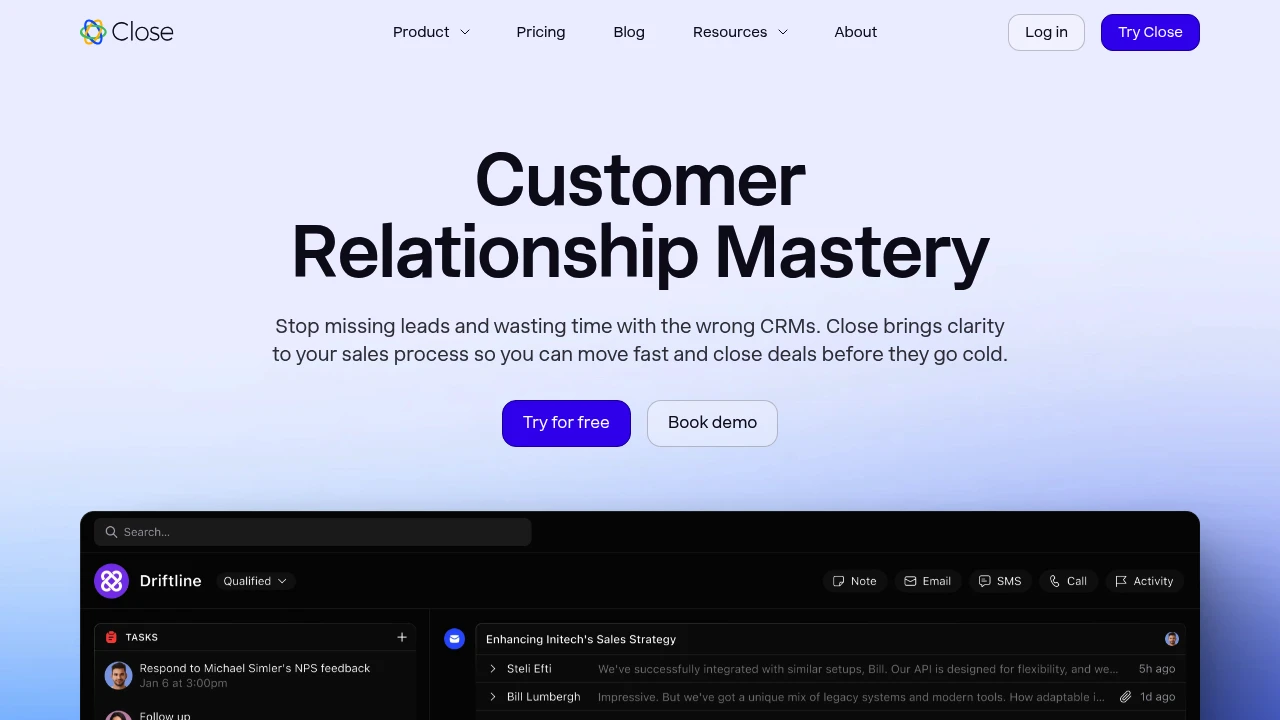
Close is a customer relationship management (CRM) platform built specifically for small and scaling sales teams that need an integrated calling, email and SMS workflow. Unlike general-purpose CRMs that focus primarily on record-keeping, Close combines communications (outbound/inbound calling, email, and texting) with pipeline management, activity logging, automation and AI-assisted features to reduce manual work for sellers.
Close targets inside sales teams, account executives, and small business sales operations that require high outreach velocity and clear activity context. Typical users are teams that make large numbers of outbound calls and follow-ups each day and want a single application to host the full sales cadence rather than stitching multiple point tools together.
Key design goals for Close include reducing context switching (by enabling calls, emails and SMS inside the app), automating routine tasks (log notes, follow-up sequences, reminders), and providing fast, actionable views of pipelines and next steps. For an overview of the platform’s capabilities, see Close’s product features pages such as their call, email and automation feature set.
Close features
Close groups the core features sales teams use into communications, automation, pipelines and AI-enabled assistance. The platform emphasizes built-in telephony, unified activity history, and automated sales workflows.
- Built-in calling: Place outbound calls and receive inbound calls from within the CRM. Call logs, recordings and dispositions attach automatically to leads and opportunities so reps retain full context without manual entry.
- Built-in email and SMS: Send and receive messages from contact records, use templates, and see message history inline with calls and activities.
- Activity logging and timeline: Calls, emails, SMS, notes and task history are centralized on each lead record to provide a single chronological context for follow-ups.
- Automation and sequences: Automate follow-ups, reminder tasks, and field updates with rule-based workflows so routine work does not require manual intervention.
- Pipeline and opportunity tools: Visual pipelines, stage automation, expected close dates and probability fields help teams manage deal flow and forecast revenue.
- Reporting and dashboards: Activity-based reporting, leaderboards, and conversion metrics let managers identify bottlenecks and measure rep performance.
- Integrations and extensibility: Native and third-party integrations for calendars, marketing tools, and helpdesk platforms allow Close to sit in an existing stack.
- AI features: AI Notetaker, AI Enrich, AI Summaries and an AI email rewrite assistant reduce manual note-taking, enrich lead data, and surface recommended actions. Read Close’s material on their AI features and automation for more details.
What does Close do?
Close consolidates the day-to-day activities of a sales rep into a single interface so teams can prospect, call, email and follow up without constantly switching apps. It records and timestamps every contact attempt (call, email, SMS), attaches notes and transcripts to the relevant leads, and surfaces reminders and next steps directly in the rep’s queue.
Close is also used to automate repetitive portions of the sales process. For example, teams can build sequences that trigger an email or create a follow-up call task when a lead reaches a certain stage or when an activity remains incomplete. This reduces the cognitive load on reps and improves follow-up reliability across the team.
Finally, Close includes analytics and reporting focused on activity and outcomes—call volume, email opens and replies, conversion rates by stage—so managers can coach reps and adjust processes based on observed performance. Close also provides speed and responsiveness as a core differentiator; their documentation highlights performance benefits in common workflows compared with larger CRM platforms, and you can review details on Close’s feature documentation and comparisons.
Close pricing
Close offers flexible pricing tailored to different business needs, from individual reps to full enterprise teams. Their pricing structure typically includes monthly and annual billing options with discounts for yearly commitments. Plans commonly align by feature set (built-in calling minutes, automations, reporting and AI features) and increase in seat-level capability for higher tiers.
Typical plan structure you will encounter when evaluating Close includes the following tiers:
- Free Plan: entry-level access or trial options (often limited in users, integrations and calling minutes)
- Starter: baseline feature set for small teams with core calling, email and pipelines
- Professional: additional automation, reporting and more calling minutes suitable for growing sales teams
- Enterprise: advanced security, custom roles, and account management for larger deployments
Each plan generally offers both monthly and yearly billing with an annual discount. For detailed inclusions—such as number of outbound minutes, automation limits, AI feature availability, and seat discounts—refer to their published plan matrix. Check Close’s detailed pricing and plan comparison to compare features and limits across the tiers.
Visit their official pricing page for the most current information.
How much is Close per month
Close offers competitive monthly billing options that vary by plan and team size. Monthly pricing typically starts at an entry tier intended for single users or very small teams, with higher tiers priced per user for expanded calling minutes, automation volume and advanced features. Exact monthly amounts depend on the plan and any current promotions; consult Close’s pricing page to see current monthly rates and to compare what each tier includes.
How much is Close per year
Close offers annual billing with discounts for year commitments. Choosing yearly billing commonly reduces the per-seat cost compared with monthly billing and may include additional benefits such as higher support levels or onboarding credits. For the latest annual prices and the percentage savings offered for yearly plans, view Close’s published options on their official pricing page.
How much is Close in general
Close pricing ranges from entry-level plans for solo users up to enterprise contracts for larger sales organizations. The total cost depends on number of seats, required calling minutes, automation usage, and whether AI features or enterprise security add-ons are needed. Small teams can typically expect modest monthly per-seat charges at the Starter level, while teams needing heavy telephony and automation should budget for Professional or Enterprise tiers. Visit their official pricing page for the most current information.
What is Close used for
Close is used to run the full cycle of inside sales activities: lead intake, outreach, qualification, and conversion. It is particularly well-suited to organizations that rely on high-volume outbound outreach, rapid follow-ups and centralized activity history to keep deals moving.
Teams use Close to:
- Centralize communications so call recordings, email threads and SMS messages are all attached to the correct lead record.
- Maintain sales cadence and follow-up reliability using sequences and automation rather than manual tracking in spreadsheets.
- Increase rep throughput by reducing context switching between phone systems, inboxes and CRM records.
- Provide managers with activity-focused metrics (calls per rep, reply rates, conversion by stage) to support coaching and process improvement.
Because Close includes calling and SMS natively, it reduces reliance on separate telephony providers for many use cases, while still offering integrations for organizations that prefer to keep existing voice solutions. Close is commonly used by B2B SaaS startups, agencies, service firms, and any small business that needs a focused, sales-first CRM.
Pros and cons of Close
Close has clear advantages for certain buyer profiles, and limitations that can matter depending on scale and ecosystem requirements.
Pros:
- Close centralizes calling, email and SMS within the CRM, which reduces context switching and speeds up rep workflows. Built-in telephony that logs activity automatically is a major time saver for teams with frequent calling needs.
- Automation and sequences reduce manual follow-up work and improve consistency across a sales team. AI features such as the AI Notetaker and AI Enrich minimize time spent on administrative tasks.
- The interface and reporting emphasize activity and next actions, which is useful for managers focused on throughput and converting leads quickly. Close’s product is positioned to be faster in common sales workflows compared with larger, more generic CRMs; see Close’s material on feature performance in their product documentation.
Cons:
- For companies that require extensive CRM customizations, complex sales hierarchies, or very deep ecosystem integrations (ERP, large marketing automation stacks), Close may be less flexible than enterprise-grade platforms like Salesforce.
- Organizations that already have telephony deeply embedded in another system may need to reconcile integrations or accept some redundancy when moving to Close’s native calling.
- Large enterprises sometimes require compliance certifications, custom SLAs and advanced identity management beyond standard offerings—these needs may be addressed only at the highest tiers or via enterprise contracts.
When evaluating Close, match the platform’s strengths—speed, built-in communications, and sales-first workflows—against your requirements for scale, integrations and enterprise security.
Close free trial
Close commonly offers a free trial period to let teams test core flows—import leads, make calls, send emails and run basic automations—before committing to a paid plan. Trials are designed to demonstrate day-to-day seller workflows and let decision-makers assess fit for their sales process.
During a trial you should evaluate the following:
- How quickly reps can import contacts and begin outreach using built-in calling and email.
- Whether automation limits during the trial reflect the volume you’ll need in production, and whether the automation editor supports your typical follow-up rules.
- How AI features like call summaries or automated notes perform against your team’s expectations for accuracy and helpfulness.
To start a trial and compare trial limitations to paid plan features, see Close’s pricing and trial options.
Is Close free
Close sometimes provides a limited free plan or trial period intended for evaluation or very small teams, but feature limits apply (calling minutes, automations, seats). For production use and access to advanced features such as higher automation limits and AI capabilities, teams typically move to paid tiers. Visit their official pricing page for current free-trial details and plan comparisons.
Close API
Close exposes a developer-friendly API and webhook system to integrate with external systems and automate data flows. The API supports CRUD operations on leads, contacts, opportunities, activities (calls, emails), and more—enabling developers to push leads into Close, sync activity history, or extract data for reporting.
Common integration patterns include:
- Pushing leads from website forms or marketing tools into Close for immediate outbound follow-up.
- Sending activity events (calls, replies) into data warehouses for custom analytics.
- Triggering automations in Close from external business events using webhooks or the API.
Developers can consult Close’s developer documentation, authentication methods (API keys), rate limits and schema details on the Close developer site: see Close’s API documentation and developer resources for code samples, client libraries and webhook instructions.
10 Close alternatives
Paid alternatives to Close
- HubSpot CRM — A general-purpose CRM with strong marketing automation and a free tier, HubSpot is widely used by marketing-driven teams that need unified marketing, sales and service features.
- Salesforce — Enterprise-grade CRM with extensive customization, ecosystem and partner network; suitable for organizations that require deep process automation and complex integrations.
- Pipedrive — Sales pipeline-focused CRM with an emphasis on visual pipelines and straightforward deal management for small sales teams.
- Zoho CRM — Flexible, modular CRM with a broad suite of business applications and lower-cost options for growing teams.
- Freshsales (Freshworks CRM) — CRM with built-in phone, email, and AI-based lead scoring, aimed at SMBs looking for an integrated sales and support experience.
- Outreach — Sales engagement platform focused on sequencing and outbound outreach at scale; used by SDR teams that require advanced cadence and analytics.
- SalesLoft — Sales engagement and cadence tool for managing high-volume outbound sequences and performance metrics for large inside sales teams.
Open source alternatives to Close
- SuiteCRM — A fork of SugarCRM Community Edition; offers sales, marketing and service modules with on-premise deployment options and extensive customization.
- EspoCRM — Lightweight CRM with core sales and reporting features, suitable for teams that want a self-hosted, extensible option.
- ERPNext (CRM module) — Part of a full ERP suite that includes CRM functionality; useful for organizations that want integrated accounting, inventory and sales in one open source platform.
- OroCRM — Open source CRM focused on commerce and B2B use cases, with flexibility for integration into e-commerce stacks.
- CiviCRM — CRM designed for nonprofits and membership organizations with contact management, contributions and event tracking.
Frequently asked questions about Close
What is Close used for?
Close is used for inside sales and outreach management. It centralizes calling, email and SMS alongside pipelines and automation so small and scaling teams can execute high-volume outreach while keeping activity history and next steps in one place.
How does Close handle calling and telephony?
Close integrates built-in calling directly into the CRM. Calls can be placed and received from the app, call logs and recordings attach to lead records automatically, and calling minutes are managed as part of plan limits or usage. For setup and telephony settings see Close’s calling features documentation.
Does Close have AI features?
Yes, Close includes several AI-powered features. These include an AI Notetaker that transcribes and summarizes calls, AI Enrich to pull contextual lead data from public sources, and AI summaries for messages and activity. See Close’s AI feature descriptions for specifics on availability by plan.
Can I integrate Close with my marketing tools?
Yes, Close supports integrations with common marketing and productivity tools. You can connect data from lead capture forms, email automation platforms and calendars to Close via native integrations or using the Close API and webhooks. Check Close’s integrations directory and developer docs for connectors relevant to your stack.
Is there a free trial for Close?
Yes, Close typically offers a free trial period. The trial allows teams to import leads, test calling and email workflows, and evaluate automation features before choosing a paid plan. Refer to Close’s pricing and trial options for current trial length and limitations.
Why choose Close over a general-purpose CRM?
Close focuses on built-in communications and activity-led workflows. For teams where calls, emails and rapid follow-ups drive revenue, Close reduces the number of external tools and automates routine tasks, which can increase rep speed and consistency compared with CRMs that require additional telephony integration.
When should a company consider moving from Close to a different CRM?
When organizational complexity outgrows Close’s scope or when enterprise-level customizations are required. Companies that need very complex territory rules, multi-product contract management, or deep ERP and finance integrations may outgrow Close and evaluate enterprise CRMs like Salesforce.
Where can I find technical documentation for Close?
Close maintains developer and API documentation online. The Close developer site includes API references, webhook guides and client libraries to help engineering teams integrate Close with other systems: see Close’s developer documentation.
Does Close support enterprise security and compliance?
Close provides security features appropriate for many businesses and offers enterprise-level controls on higher plans. Typical options include role-based access, SSO, and data protection controls; for specifics on certifications, encryption and compliance, review Close’s security and compliance documentation.
How do I migrate data into Close?
Close supports CSV import and API-driven migrations for lead and contact data. You can import spreadsheets to create leads, contacts and opportunities, and use the API for larger or ongoing migrations. Close’s import guides and developer docs outline field mapping, duplicate handling and best practices for clean migrations.
Close careers
Close maintains a careers page listing open roles across product, engineering, sales, customer success and operations. Job listings typically include remote or hybrid options, a description of responsibilities, required skills and information about the company culture. For current openings, see Close’s careers page and job listings.
Close affiliate
Close sometimes partners with agencies and consultants who recommend the platform as part of sales stack implementations. If you are interested in affiliate or partner opportunities—reseller programs, integrations partnerships or consultant referrals—review Close’s partner information or contact their sales team via the options listed on their site.
Where to find Close reviews
Independent user reviews and ratings for Close can be found on industry review sites where buyers compare CRMs. Look for detailed user feedback on review platforms such as G2, Capterra and TrustRadius to read about real-world experiences with onboarding, telephony reliability, automation limits and support responsiveness. You can also review customer case studies and testimonials on Close’s own site to understand typical use cases and outcomes.

Similar to Close


