
Insightsoftware
Enterprise reporting and financial analytics platform for finance, accounting, and FP&A teams that connects to ERPs and consolidates financial data for reporting, dashboards, planning, and audit-ready disclosures.
What is insightsoftware
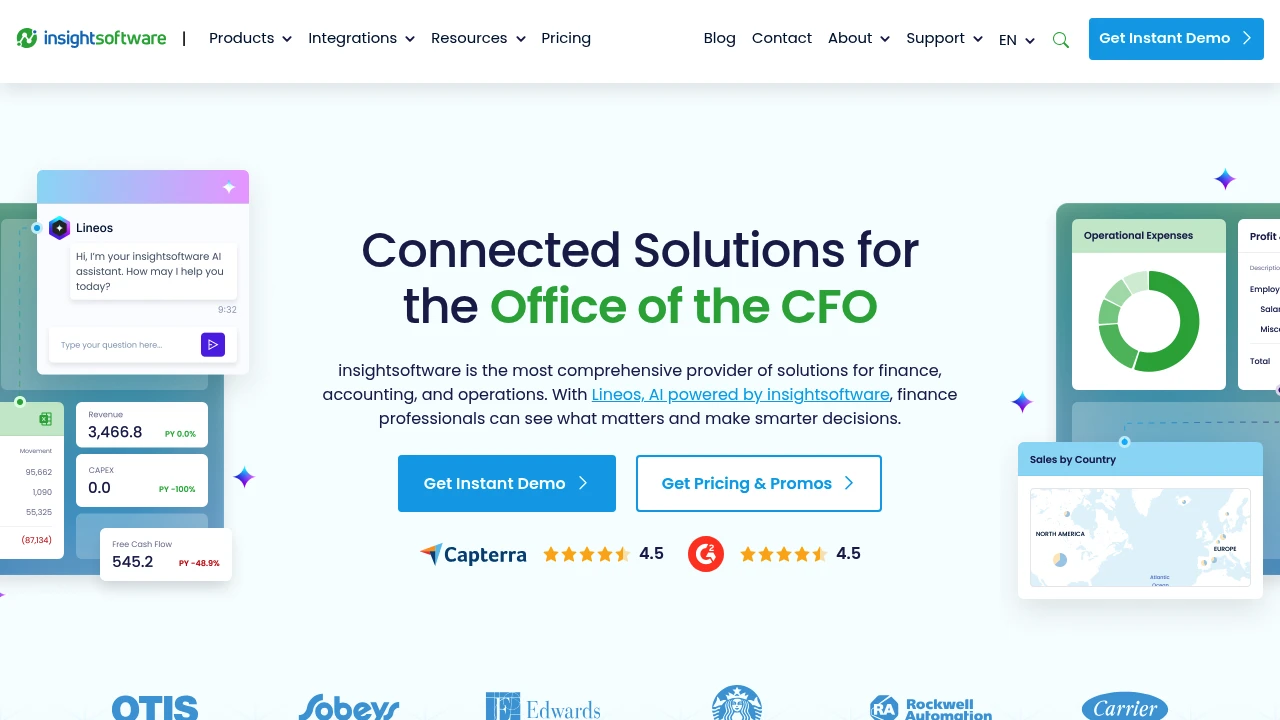
insightsoftware is a suite of enterprise financial reporting, analytics, and planning tools designed for finance, accounting, and operational teams. The product set integrates directly with leading ERPs and general ledgers to produce operational reports, statutory financials, management dashboards, and planning models without forcing teams to manually reconcile multiple spreadsheets. Typical deployments sit in finance, FP&A, consolidation, and reporting centers of excellence in mid-market and large enterprises.
The platform family includes modules and products for Excel-based reporting, embedded reporting in ERP screens, automated disclosures, dashboarding and data visualizations, and budgeting and forecasting. Deployments can be cloud-hosted, hybrid, or on-premises depending on customer requirements and data residency rules. Implementation patterns commonly include a connector layer to the ERP, a modeling/reporting layer that maps chart-of-accounts and dimensions, and a presentation layer for automated reports and dashboards.
insightsoftware targets finance users who need audit-ready reporting tied to source systems, as well as operational users who require self-service analytics connected to transactional systems. The vendor positions the suite to reduce manual reconciliation work, accelerate month-end close, and make budgeting and forecasting more collaborative and repeatable.
Insightsoftware features
What does insightsoftware do?
insightsoftware provides a set of capabilities focused on financial reporting, business intelligence, and performance management. Core functions include: automated financial statements, board and management reporting, operational dashboards, planning and budgeting, and integrations to ERP systems for direct data access. Feature components are designed to let finance teams build reports in Excel or web dashboards while retaining a live data link to source systems.
Key platform features include data connectors, an Excel reporting add-in, web-based dashboarding, report automation and distribution, consolidation and close support, audit trails and version control, and role-based security. The platform supports both scheduled and event-driven report generation, along with automated distribution to email, SharePoint, or document repositories.
The suite also includes template libraries for common regulatory and management reports, pre-built content for major ERP systems, and a formula engine for advanced calculations. Administrators can control data access by user group or dimension, and change logs maintain auditability required for external reporting and compliance.
Insightsoftware pricing
Insightsoftware offers these pricing approaches:
- Starter: $2,000/year for single-module, small-team deployments (example baseline pricing for a single reporting module with limited connectors)
- Professional: $10,000/year for cross-module deployments with multiple connectors and dashboarding capabilities
- Enterprise: $30,000/year and up for full-suite licensing, multi-entity consolidation, advanced security, and premium support
Pricing for insightsoftware is typically quoted as an annual subscription or as an enterprise perpetual license plus annual maintenance. Many customers purchase bundles by module (reporting, planning, consolidation) and pay additional fees for connectors to specific ERPs, number of users, and implementation/consulting services. Larger implementations commonly include multi-year licensing commitments and tiered maintenance.
Check Insightsoftware's current pricing and licensing options (https://insightsoftware.com/pricing) for the latest rates and enterprise options. For precise quotes the vendor requires information about ERP platform, number of legal entities, number of concurrent finance users, and desired modules.
How much is insightsoftware per month
Insightsoftware starts at $167/month (annualized) for very small starter configurations when priced as the $2,000/year Starter example above. Most professional and enterprise deployments are billed annually and translate to higher monthly equivalents depending on module count and services.
Monthly equivalents are commonly provided only as a convenience; vendors typically require annual billing for enterprise licensing. For month-to-month or short-term pilots, contact Insightsoftware to discuss trial or proof-of-concept pricing.
How much is insightsoftware per year
Insightsoftware costs $2,000/year for Starter, $10,000/year for Professional, and $30,000+/year for Enterprise as typical example tiers. These are illustrative bandings that reflect small, mid-market, and enterprise scope; actual contracted rates vary based on connectors, user counts, and support levels.
Enterprise customers often negotiate multi-module bundles, implementation services, and multi-year discounts. Implementation costs (consulting, data modeling, and testing) are frequently charged separately and can materially increase first-year totals.
How much is insightsoftware in general
Insightsoftware pricing ranges from approximately $2,000/year for a single-module starter setup to $30,000+/year for a full-suite enterprise deployment. This range reflects the product’s positioning as an enterprise financial reporting and performance management solution.
Customers should budget for the software subscription plus implementation fees, ongoing maintenance, connector licensing for specific ERPs, and optional premium support. Typical first-year budgets for medium-sized organizations often include both subscription and one-time services and can range from low five figures to six figures for multi-entity rollouts.
What is insightsoftware used for
insightsoftware is used to automate financial reporting and to provide finance and operational teams with live access to ERP and ledger data for analysis. Organizations use it to replace manual spreadsheet-driven processes for month-end close reporting, to produce consolidated financial statements, and to distribute board and management packs on a scheduled basis.
Common use cases include management reporting with drill-down to source transactions, statutory reporting and disclosure automation, rolling forecasts and scenario planning, operational KPI dashboards, and group consolidation across multiple currencies and legal entities. The platform is often used to centralize reporting logic so finance teams can update reports in one location and push consistent outputs across the organization.
Beyond finance, operational teams use insightsoftware for inventory analysis, revenue and margin reporting, and integrating sales or procurement data with financial metrics. The ability to connect directly to ERPs eliminates manual extracts and reduces reconciliation time between operational and financial reporting.
Pros and cons of insightsoftware
insightsoftware is strong in delivering ERP-aware reporting and finance-focused analytics. Pros include deep connectors to major ERPs, an Excel-native reporting option that reduces training friction for finance, and strong audit and security controls needed for statutory reporting. The vendor’s pre-built content for common ERPs accelerates time-to-value and reduces the extent of bespoke development.
The platform supports both technical and business users: developers and BI teams can create centralized models, while finance analysts use Excel add-ins or no-code dashboards to author reports. This mixed-mode capability reduces handoffs between IT and finance and can shorten close cycles.
On the downside, enterprise financial reporting suites require careful planning and governance. Initial implementation and data model alignment can be time-consuming, especially for organizations with complex chart-of-accounts, intercompany eliminations, or legacy ERP customizations. Costs for multi-entity and multi-module deployments can escalate, and smaller teams should budget for professional services and change management.
Some customers report a learning curve for advanced features like consolidation logic, advanced formula scripting, or embedding reports into existing portals. Ongoing administration—managing connectors, user roles, and data refresh schedules—requires clearly defined operational ownership within finance or IT.
Insightsoftware free trial
Insightsoftware typically offers product demonstrations and time-limited proofs of concept rather than an open, self-service free tier. Demos can be configured to show live connections to sample ERP data and the specific reporting templates most relevant to a prospect. Proof-of-concept engagements are often scoped for a few weeks and may carry a professional services fee depending on the complexity.
For teams evaluating features, a staged approach works well: run a targeted proof of concept that focuses on a single reporting use case (for example, automated income statement roll-forward) to validate connectors, data mapping, and distribution workflows. This approach minimizes risk and helps quantify potential time savings and error reduction.
Check Insightsoftware’s demo and trial options (https://insightsoftware.com/demo) to request a tailored proof of concept and to understand any associated costs.
Is insightsoftware free
No, insightsoftware is not offered as a free product for enterprise use. The platform is typically sold as a paid subscription or perpetual license with professional services for implementation. Occasional demo or trial periods may be available under negotiated terms.
Insightsoftware API
Insightsoftware provides APIs and integration tooling designed to support automation, embed reporting in external applications, and allow programmatic data retrieval. Typical API capabilities include REST endpoints for retrieving report results, pushing data into planning models, and managing scheduling and distribution workflows. APIs enable automation of report generation, integration with ticketing and workflow systems, and extraction of data for secondary use in data warehouses or visualization tools.
For developers, the vendor documents authentication methods, rate limits, and payload formats in its developer portal. Common integration patterns use the API to trigger a server-side report run and to retrieve PDF, Excel, or JSON outputs. The platform also supports webhooks for event-driven integrations and has SDKs or connector modules for major ETL platforms.
Administrators should secure API access with token-based authentication, restrict permissions by role, and audit API usage to meet compliance requirements. For advanced scenarios, the API can be combined with a data warehouse or staging area to support large-scale analytics and machine learning pipelines.
Check Insightsoftware's API documentation and developer resources (https://insightsoftware.com/developers) for exact endpoints, authentication details, and example code.
10 Insightsoftware alternatives
Paid alternatives to insightsoftware
- Adaptive Insights (Workday Adaptive Planning): Cloud-native planning, budgeting, and forecasting with modeling optimized for FP&A teams; strong in driver-based planning and collaboration.
- Vena Solutions: Excel-first FP&A and financial planning platform that layers a centralized database and workflow on top of Excel spreadsheets; well-suited for teams that want to keep Excel as the primary authoring environment.
- Anaplan: Connected planning platform designed for large-scale, cross-functional modeling and scenario analysis with in-memory calculation engine for complex use cases.
- Oracle Cloud EPM: Full-suite enterprise performance management with consolidation, close, tax reporting, and integrated planning for large Oracle-centric customers.
- BlackLine: Focuses on account reconciliation, close automation, and continuous accounting; complements reporting tools by automating close controls and reconciliation tasks.
- OneStream XF: Corporate performance management platform that combines consolidation, planning, reporting, and financial data quality in a single product, often used by multinational organizations.
- SAP Analytics Cloud: Integrates analytics, planning, and predictive capabilities with SAP back-ends; strong for SAP-centric landscapes.
Open source alternatives to insightsoftware
- Metabase: Open source BI tool that provides simple dashboards and queries for non-technical users; suitable for lightweight analytics but lacks deep financial consolidation features.
- Apache Superset: Scalable open source data visualization platform with a SQL-native interface for building dashboards; good for operational analytics but requires more engineering for finance-specific features.
- BIRT (Eclipse BIRT): Open source reporting platform focused on creating pixel-perfect reports embedded in web applications; requires developer effort to connect to enterprise ERPs and to add consolidation logic.
- ReportServer: Open source reporting platform that supports multiple reporting engines and scheduling; can be extended for finance reporting with custom development.
Frequently asked questions about Insightsoftware
What is insightsoftware used for?
Insightsoftware is used for financial reporting, consolidation, budgeting, and analytics. Finance and FP&A teams use it to produce audit-ready financial statements, operational dashboards, and rolling forecasts that connect directly to ERP data sources. It reduces manual spreadsheet reconciliation and automates distribution of management and statutory reports.
Does insightsoftware integrate with SAP and Oracle?
Yes, insightsoftware provides pre-built connectors for major ERPs such as SAP and Oracle. These connectors access GL, sub-ledger, and sub-system data to populate reports and dashboards without manual extracts. Integration includes mapping tools for chart-of-accounts and dimensional data.
How much does insightsoftware cost per user?
Insightsoftware typically starts at bundle pricing rather than a simple per-user fee; small starter deployments can be in the low thousands per year. Larger multi-module, multi-entity deployments commonly move into mid-five-figure to six-figure annual agreements depending on scope and services.
Is there a free version of insightsoftware?
No, insightsoftware does not offer a free production version for enterprise reporting. Prospects can request demos or proofs of concept that are time-limited and scoped to particular reporting needs.
Can insightsoftware be used for group consolidation and intercompany eliminations?
Yes, insightsoftware supports consolidation and intercompany eliminations as part of its consolidation modules. These features include currency translation, elimination logic, minority interest handling, and consolidated reporting suited to statutory and management requirements.
Does insightsoftware have an Excel add-in?
Yes, insightsoftware includes an Excel reporting add-in that lets finance users author reports with live data connections. The add-in preserves formatting while retrieving up-to-date ledgers and dimensions, enabling familiar Excel-based workflows with centralized control.
Can I embed insightsoftware dashboards in other systems?
Yes, insightsoftware supports embedded dashboards and report outputs via iFrames or API-driven embed techniques. This allows organizations to place finance dashboards inside intranet portals, ERP screens, or business application pages for broader visibility.
How secure is insightsoftware for financial data?
Insightsoftware supports enterprise-grade security including role-based access, encryption in transit and at rest, and audit logging. Security posture varies by deployment model (cloud vs on-premises), and enterprise customers can request SOC and compliance documentation as part of procurement.
Does insightsoftware offer automated report distribution?
Yes, automated scheduling and distribution are core features—reports can be scheduled to run and delivered by email, FTP, SharePoint, or document management systems. Distribution can be parameterized by entity, department, or user role to deliver tailored outputs.
What types of support and training are available for insightsoftware?
Insightsoftware offers vendor-led training, documentation, and professional services for implementation and optimization. Customers typically receive standard support with paid tiers offering faster SLAs, dedicated customer success resources, and optional on-site consulting for large rollouts.
insightsoftware careers
Insightsoftware hires professionals across product development, professional services, pre-sales, customer success, and corporate functions. Roles commonly include ERP integration consultants, financial solution architects, software engineers with experience in data connectors and APIs, and customer success managers who specialize in financial reporting and consolidation. Job descriptions emphasize knowledge of accounting processes, familiarity with ERP systems, and the ability to translate finance requirements into technical designs.
Career growth paths often move from consulting or implementation roles into product management, solutions engineering, or leadership in customer success. For developers, opportunities exist to work on connectors, API services, and visualization components. Professional services consultants typically gain deep domain knowledge in industry-specific reporting requirements and can transition into permanent customer roles or senior solution architect positions.
To find current openings and details about hiring locations and compensation bands, review Insightsoftware’s careers portal (https://insightsoftware.com/careers) or check major job platforms for posted roles.
insightsoftware affiliate
Insightsoftware runs partner and reseller programs to extend its sales and implementation reach. Affiliate and partner opportunities commonly include referral arrangements, implementation partnerships, and OEM or reseller agreements for systems integrators. Partners receive access to training, product certification, and partner-specific resources to help scope and deliver customer projects.
Affiliate structures vary by region; technology partners such as ERP vendors or cloud hosting providers may have co-selling arrangements and joint solution listings. Consultants and small reseller firms often use the partner program to combine insightsoftware licenses with their own implementation services.
If you are considering becoming a partner or affiliate, contact their partner team through Insightsoftware’s partner program page (https://insightsoftware.com/partners) to request current program terms and certification requirements.
Where to find insightsoftware reviews
You can find user reviews and vendor comparisons on major software review sites and industry analyst reports. Common places to check include Gartner Peer Insights, G2, and TrustRadius where finance and IT buyers post implementation experiences, feature ratings, support responsiveness, and ROI anecdotes. Review platforms typically include structured ratings for ease of use, integration, support, and value.
For case studies and reference customers, consult Insightsoftware’s customer stories and whitepapers on their website, which provide specific examples of implementations and benefits realized. When evaluating reviews, compare comments about ERP compatibility, time-to-value, and required professional services to match expectations for your organization.
Research notes:
- Primary source of product positioning and URL: https://insightsoftware.com
- Pricing is typically proprietary and enterprise-quoted; presented here as illustrative annual tiers ($2,000/year, $10,000/year, $30,000+/year) with explanatory context and a link to the vendor’s pricing and licensing page (https://insightsoftware.com/pricing).
- Feature and integration lists reflect common capabilities for enterprise financial reporting suites: Excel add-ins, ERP connectors (SAP, Oracle, Microsoft Dynamics, NetSuite), consolidation, planning, dashboards, automation, and APIs. Recommend checking Insightsoftware's integrations and developer pages for exact connector and API documentation (https://insightsoftware.com/integrations, https://insightsoftware.com/developers).

Similar to Insightsoftware


